











There’s a growing ecosystem of AI coding agents: Claude Code, Cursor, Copilot, Codex, Gemini CLI, Windsurf, and others. They’re good at writing code, but they don’t inherently know how to instrument that code for observability, configure monitoring infrastructure, or troubleshoot production systems using real telemetry data. That knowledge lives in documentation, runbooks, and the heads of your senior SREs.
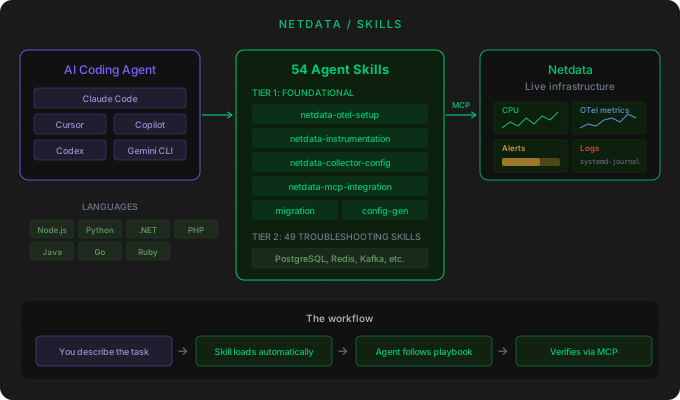
We’ve open-sourced a repository that encodes this knowledge into a format AI agents can use directly. netdata/skills is a collection of agent skills, published in the open agentskills.io format, that teach AI coding agents how to set up Netdata, instrument applications with OpenTelemetry, build collector pipelines, troubleshoot 49 specific technologies, and verify everything against live data via MCP.
When you ask your AI agent to “instrument my Python service with OpenTelemetry” or “diagnose why PostgreSQL latency is climbing,” the agent loads the relevant skill and follows a step-by-step process grounded in real Netdata operational knowledge.

The OTel skills: from zero to instrumented
The foundational skills focus heavily on OpenTelemetry because that’s where most teams hit friction. Setting up an OTLP receiver, instrumenting applications across different languages, and building collector pipelines are all tasks with many moving parts and configuration surfaces. These are exactly the kind of tasks where an AI agent with the right reference material can save significant time.
netdata-otel-setup fires when you need to enable OTLP ingestion on Netdata. It walks the agent through editing otel.yaml, configuring the gRPC endpoint, setting up TLS, writing metric mapping rules in /etc/netdata/otel.d/v1/metrics/, and verifying that data arrives. Ask your agent “Enable OTLP gRPC ingestion on my Netdata agent and configure TLS” and it loads this skill automatically.
netdata-instrumentation covers adding OpenTelemetry SDKs to your application code. It has language-specific rules for Node.js, Python, Java, Go, .NET, Ruby, and PHP. Each rule file contains the exact packages to install, initialization code, and configuration to get traces and metrics flowing to Netdata. The content is tested: the Node.js rule file matches the E2E test fixture byte for byte, so the skill teaches exactly what the test validates.
netdata-collector-config handles building OpenTelemetry Collector pipelines. It covers DaemonSet deployments, gateway mode, and the OTel Operator, with configurations that forward telemetry into Netdata. If you need to get Kubernetes node telemetry into Netdata via an OTel Collector pipeline, this skill produces the Helm values and pipeline configuration.
MCP: skills that query live data
Netdata exposes an MCP (Model Context Protocol) server that lets AI agents query live telemetry data. The netdata-mcp-integration skill teaches agents how to connect to your Netdata instance via MCP, and once connected, the troubleshooting skills use MCP queries to verify state and cross-reference signals against real data from your infrastructure.
The practical implication: when you ask “PostgreSQL p99 latency has been climbing all morning, figure out what changed,” the agent doesn’t just give you a generic troubleshooting checklist. It loads the PostgreSQL troubleshooting skill, connects to your Netdata via MCP, queries the actual metrics (connection counts, lock waits, query statistics, replication lag), and walks through the analysis using your real data.
This closes the loop between “the agent knows what to look for” and “the agent can actually look.” Skills provide the knowledge. MCP provides the access. Together, they give the agent the ability to do real troubleshooting rather than just suggest things to try.
Technology-specific troubleshooting skills
Each troubleshooting skill maps to a specific technology and is generated from Netdata’s operator playbooks. They cover the failure archetypes that matter for each technology: connection exhaustion, replication lag, memory pressure, cache eviction rates, queue depth, and so on. The full list spans from Apache and Nginx to Kubernetes and PostgreSQL and everything in between.
You don’t need to know which skill to invoke. Describe the symptom and the agent matches on intent: “Redis is dropping client connections under load” routes to the Redis skill. “Kafka consumer lag is stuck on partition 7” routes to Kafka. “NGINX is returning 502s intermittently” routes to NGINX and correlates upstream health with request rate.
Migration and requirements-to-config
Two other foundational skills are worth calling out.
netdata-migration handles moving from Datadog, New Relic, Dynatrace, or Prometheus to Netdata. It maps existing APM and infrastructure configurations to their Netdata equivalents. If you’re evaluating Netdata or actively migrating, this skill gives your AI agent the context to help with the translation.
netdata-config-from-requirements is useful for solutions engineering and pre-sales. Give it a prospect’s requirements document and it produces an otel.yaml, Collector Helm values, per-language instrumentation snippets, and a verification runbook. No code access required, just the requirements doc as input.
Skills compose naturally
Because the agent matches on prompt intent rather than exact phrases, you can ask for things that span multiple skills and the agent chains them together. “Stand up Netdata OTLP ingestion, instrument our Node.js checkout service, then verify via MCP that metrics arrived” fires three skills in sequence: otel-setup, instrumentation, and mcp-integration.
“Migrate our Kubernetes telemetry pipeline from Prometheus remote-write to Netdata, keeping the same dashboards” chains migration with collector-config.
This composability is important because real infrastructure tasks rarely map to a single skill in isolation.
How to install
For Claude Code:
/plugin marketplace add netdata/skills
/plugin install netdata-skills@netdata-skills
Restart the session and all 50+ skills activate automatically. The repo also works with Cursor, Codex, Gemini CLI, Copilot, Windsurf, Zed, Continue.dev, and Cline. Installation paths for each client are in the docs.
What this means for Netdata users
If you use an AI coding agent for development work, these skills extend that agent’s capabilities into infrastructure and observability. Instead of context-switching between your editor and monitoring documentation, you stay in your coding environment and let the agent handle the instrumentation, configuration, and troubleshooting workflows.
Combined with the Netdata Cloud MCP server, this creates a workflow where your AI agent can instrument your code, configure the monitoring pipeline, query live telemetry to verify everything works, and troubleshoot issues when they arise, all from the same session.
The repo is open source under Apache 2.0. Contributions are welcome, especially skill corrections and new technology playbooks.