













It feels less like managing devices and more like remote babysitting. You check the dashboard, everything is green, and then a customer in the field tells you a device has been down for two days. At a handful of servers, the rare failure is an event. Across thousands of distributed Linux endpoints — robots in warehouses, EV chargers across a city, kiosks in retail, IoT gateways in the field — the rare failure becomes a daily occurrence, and the tools built for a datacenter quietly stop telling you the truth.
Fleet observability is full per-device visibility across that population, rolled up so a small team can run a fleet far larger than itself. It is a different problem from monitoring a Kubernetes cluster, and it needs a different architecture: edge-resident instead of centralized, outbound-only instead of pull-based, and store-and-forward instead of always-connected.
This walks through what makes fleet observability hard, the architecture that handles it, and the numbers you can expect — no comparison tables, just the failures fleets hit and how Netdata answers each.
At a glance
For operators who already know they need this and want the numbers:
- Agent Footprint: depending on metrics collected and architecture, 80-200 MiB RAM, 1-2% of a CPU core per 1k metrics/s, 1-5 KB/s egress, tunable at every dimension.
- Streaming bandwidth: ~1KB/s sustained every ~1k metrics per device, scaling linearly with metric count.
- Energy efficiency: the University of Amsterdam’s peer-reviewed ICSOC 2023 study found Netdata the most energy-efficient monitoring solution tested, even with per-second collection and edge machine learning.
- Architecture: push-native, outbound-only streaming; store-and-forward with double-buffered RAM pages. Can keep its database entirely in RAM (zero time-series disk I/O) on flash-constrained devices, while still monitoring disk health.
- Liveness model: every chart and aggregate shows how many nodes are contributing right now — “CPU is 47%, from 4,723 of 5,000 devices” — built on the NIDL data model, with no query to write.
- Economics: open-source agent; per-node Cloud pricing with no cardinality dimension and no egress charge; fleet pricing for large deployments. Data stays on your network — Cloud is metadata-only.
What makes fleet observability different from datacenter monitoring
Datacenter monitoring assumes stable connectivity, central servers, and effectively unlimited per-host resources. Fleet observability assumes the opposite of all three. Four constraints define the workload.
Distribution. Hundreds to tens of thousands of endpoints, not a handful of servers. Every per-device cost is multiplied by fleet size. A 200 MB agent on 5,000 devices is a terabyte of fleet RAM spent on observability alone. An agent that doubles in memory is not a 2× problem — it is a 5,000× problem.
Intermittent connectivity. Devices sit behind NAT and carrier-grade NAT. They use cellular, satellite, or metered links. Many connect outbound only. Pull-based monitoring — the cloud-native default — simply cannot reach half the fleet. Local-first is mandatory, not a nice-to-have.
Resource-constrained hardware. ARM SBCs, industrial gateways, Jetsons, commodity x86. Per-endpoint RAM and CPU budgets are deliberately modest, and the people who run these fleets treat the observability agent as a guest that must not starve the workload it is there to watch.
Per-endpoint economics. Every architectural decision compounds across the fleet. Per-host SaaS pricing at thousands of devices produces annual bills that do not match the segment’s economics, and egress on cellular is a separate, real line item.
Two mental shifts follow from these constraints. First, a real fleet is always partially degraded — expect a few percent of devices to be offline or impaired at any moment. If your dashboard shows 100% green, suspect the observability before you trust it. Second, the fleet is a population, not a machine. You reason about it epidemiologically — outbreaks, index cases, chronic conditions. A single failing device is a data point; a pattern across devices is the signal.
The fleets this architecture is built for
The same distributed-fleet shape appears across industries that look nothing alike. The observability requirements are nearly identical:
- Robotics — AMRs, warehouse robots, drones, ROS2 fleets. On-robot Linux compute, often Jetson or industrial SBC.
- Kiosks and POS terminals — self-service and retail endpoints across many sites. Small Linux PC or SBC, frequently with a microcontroller peripheral.
- EV chargers — charge-point networks speaking OCPP, on embedded Linux controllers with cellular or satellite uplinks.
- IoT and industrial gateways — edge gateways, SCADA front-ends, environmental sensing on Raspberry Pi, Jetson, or industrial-grade hardware.
- School-safety and field devices — embedded Linux endpoints on campuses or remote sites.
- MSP-managed Linux estates — thousands of commodity Linux servers spread across many client environments.
The pattern is consistent: hundreds to tens of thousands of endpoints, behind NAT, on intermittent links, run by a small team that needs full per-device visibility and fleet-wide rollups at the same time.
Knowing what’s online: liveness is the first job
The most common failure mode in fleet observability isn’t a bad metric. It’s silence.
Dashboards show 100% green because 15% of the fleet stopped reporting and nobody noticed. The remaining 85% look fine. Alerts don’t fire because missing data isn’t treated as a signal. This is the “all green but sick” problem, and it is the main reason fleet operators lose trust in their monitoring — the device is green on the dashboard and dead in the field.
Netdata addresses this at the data-model level. Every chart, every dashboard, every aggregate — from “fleet CPU average” to “per-device memory” — shows how many nodes are contributing data, right on the chart, without writing a query. Not “CPU is 47%.” It’s “CPU is 47%, from 4,723 of 5,000 devices.” Because the data is edge-resident, the chart knows whether the full set is reporting or not — and the same holds whether that set is fifty devices or fifty thousand, because the architecture scales linearly as you add Parents.
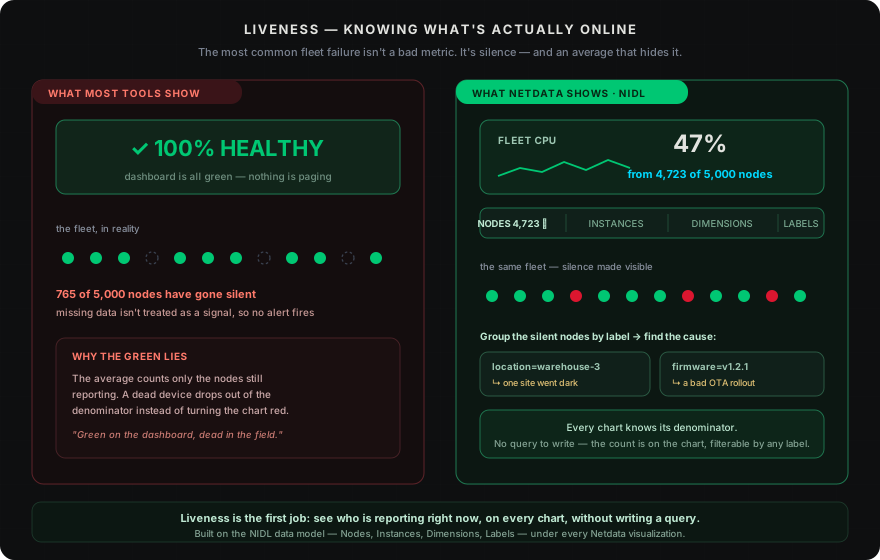
This is the NIDL framework — Nodes, Instances, Dimensions, Labels — the data model under every Netdata visualization. Every dropdown on every chart shows the count of contributing time-series, their volume-contribution percentage, their anomaly rate, and min/avg/max over the visible window. You don’t write a query to find which devices are missing; you see it.
Each child agent’s connection is also tracked on the Parent as its own set of metrics. A per-child state series moves through running, replicating, waiting, offline, and archived; the age of the current state is tracked in seconds, and streaming traffic in and out is measured per child. If a group of devices goes dark, you know in seconds — and the picture is filterable by any label.
Group offline devices by location=warehouse-3 and you spot a site outage. Group by firmware=v1.2.1 and you catch a bad OTA. Group by device_type=wireless-bridge and you find the cellular tower that went down. The epidemiological reasoning fleet ops demands happens through the same dropdowns, not through custom queries. Netdata also ships a built-in node-disconnected health check; route it to your notification channel so a silent device pages you instead of waiting for a customer to call.
The disk problem that kills fleets
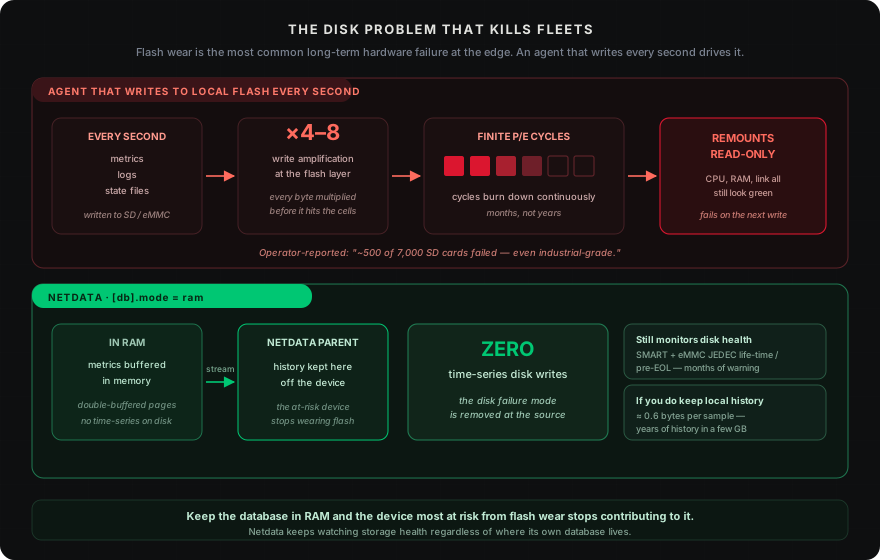
Flash storage failure is the most common long-term hardware failure in distributed fleets. The community-reported experience of “~500 SD cards fail even with industrial” out of a 7,000-device Raspberry Pi deployment is not theoretical — it’s an operator living it.
The mechanism is well understood. Embedded flash has finite program/erase cycles. Write amplification multiplies every byte written by 4–8× at the physical layer. A monitoring agent that writes to disk every second — metrics, logs, state files — continuously burns those cycles. Eventually the filesystem remounts read-only, the device still looks healthy on CPU, RAM, and link, and nobody knows until an application crashes on a failed write.
Netdata can be configured to keep its database entirely in RAM, eliminating time-series disk writes altogether ([db].mode = ram). The agent buffers metrics in memory and streams them to a Parent, so the device that is most at risk from flash wear stops contributing to it — while Netdata keeps monitoring disk health (via disk statistics and SMART) regardless of where its own database lives. And for devices that do keep local history, Netdata stores it remarkably compactly — years of history in a few gigabytes, at roughly 0.6 bytes per sample.
Connectivity: works behind NAT, and offline
Fleet endpoints are behind NAT. They’re on cellular. They connect outbound only. This is not a misconfiguration; it’s the architecture of the network. “Never trust cellular connectivity; always assume you’ll lose the connection — local-first is mandatory” is how operators who run vehicle fleets describe it.
Most monitoring systems assume reachability. Scraping systems need each endpoint to expose a port and accept inbound connections. Even many push-based SaaS agents assume a stable link. Neither pattern survives the fleet reality: devices that appear, disappear, switch networks, drop to 2G, or go silent for days.
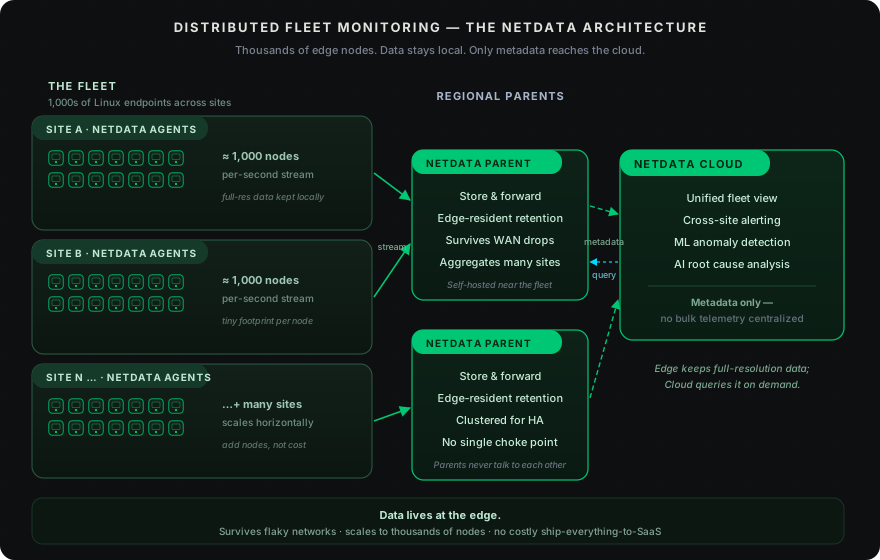
Netdata’s streaming is push-native and outbound-only. A child agent opens an outbound connection to a Netdata Parent. There is no inbound port and no scrape target, so NAT and carrier-grade NAT are not obstacles. The child can fall back between interfaces and switch providers and IPs; as long as it can reach a Parent, it streams. When a child reconnects, it backfills the gap from its local history, so your charts have no holes — by default it catches up the last day, and you can configure how far back it reaches.
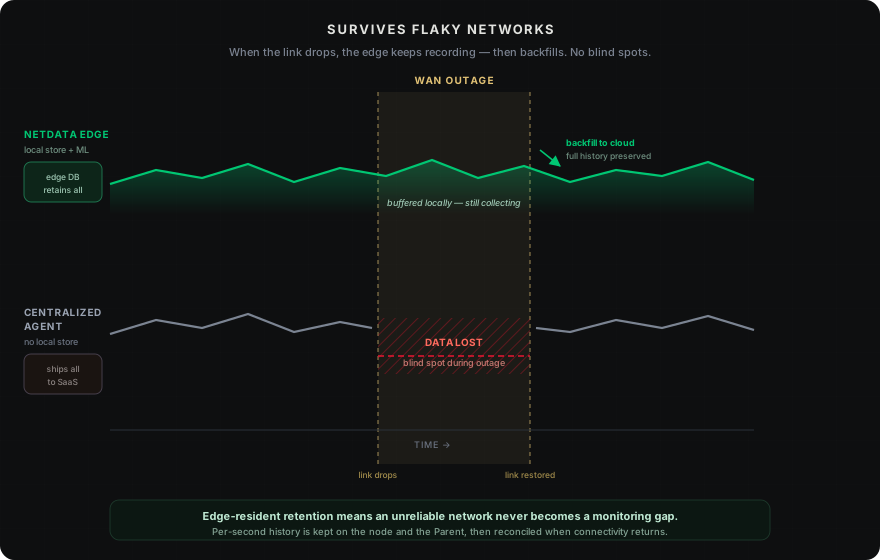
Because a child streams continuously, the Parent notices the moment the data stops — a powered-off device or a dropped NAT mapping shows up right away as a child gone silent, not as a phantom connection that lingers. Operators choose their compression — ZSTD by default, with LZ4, Brotli, and GZIP available — to trade CPU against bandwidth.
Netdata also handles the reconnect storm — the moment after a regional cellular outage when thousands of devices come back simultaneously. On the agent side, reconnects use a randomized delay (jitter) within a fixed window and rotate across available Parents; on the Parent side, a waiting queue admits connections and replication in a controlled way. The central tier absorbs the surge instead of collapsing under it. The trade is a few minutes of reconnection latency for reliable recovery.
The edge agent footprint
When the goal is to monitor a fleet of thousands of nodes, footprint is the master constraint. Every byte of RAM, every CPU percent, every bit of egress is multiplied by the device count.
Netdata is batteries-included by default: hundreds of collectors auto-detect at install, dashboards are auto-generated, and zero YAML is required to see the first chart. What the Netdata Agent costs you per device, as a promise you can hold us to:
- 80–200 MiB RAM, set by how many metrics you collect and how much history you keep on the device.
- 1–2% of a CPU core per 1,000 metrics/s collected — and halving the collection frequency halves it.
- 1–5 KB/s streamed to your Parent, scaling with the number of metrics — and all of it stays on your network.
Curate down to the few hundred metrics that actually matter and the footprint shrinks with them. It stays small even on 32-bit ARM hardware, where a large share of fleet devices live.
The University of Amsterdam’s independent, peer-reviewed ICSOC 2023 study found Netdata to be the most energy-efficient monitoring solution tested, despite collecting significantly more data than any other solution evaluated. For battery-powered or power-constrained devices, that efficiency is the difference between a device that lasts two years and one that lasts ten — and at fleet scale, field visits are the dominant cost.
Streaming bandwidth, measured in the field
On cellular, bandwidth is something you pay for — so here is the promise, measured on a customer’s embedded router running in production: a device collecting around 1,000 metrics streams at about 1 KB/s, a few hundred megabytes a month. It scales linearly with metric count, so a simple kiosk streams less and a heavier gateway proportionally more. Compression is ZSTD by default (LZ4, Brotli, and GZIP are available), and because the stream goes to your own Parent, none of it leaves your network. State your metrics-per-device number and the bandwidth follows — that is the whole calculation.
What fleet monitoring costs at scale
Cost is where fleet economics diverge hardest from the datacenter. Two structural facts drive it.
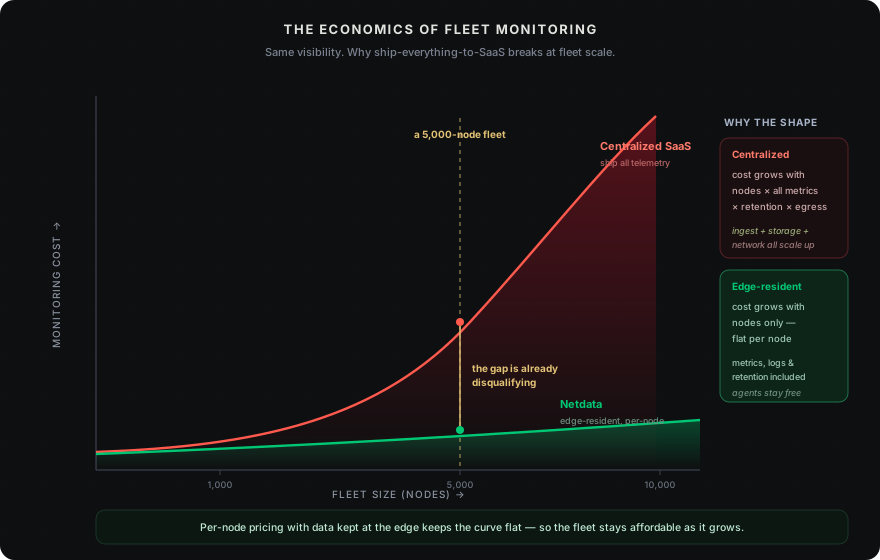
First, your data stays on your network. Your devices stream to Parents that are your own infrastructure; only metadata reaches Netdata Cloud — never your samples or logs. What leaves your network is a trickle of metadata, so the cellular-egress line item that quietly inflates cloud-monitoring bills disappears. Pricing is per node, with no cardinality dimension in the bill and no egress charge, and there is dedicated cost structure for large fleets.
Second, per-host SaaS pricing was never designed for this scale. Per-host infrastructure monitoring bills by the host every month, so the meter runs in lockstep with the fleet — a 5,000-host fleet lands north of $1M a year before any negotiated discount. The point isn’t a vendor scoreboard; it’s that any per-host model turns into a seven-figure decision the moment a fleet has thousands of devices. The full per-node breakdown is in our detailed cost comparison.
Diagnosing a device you can’t touch
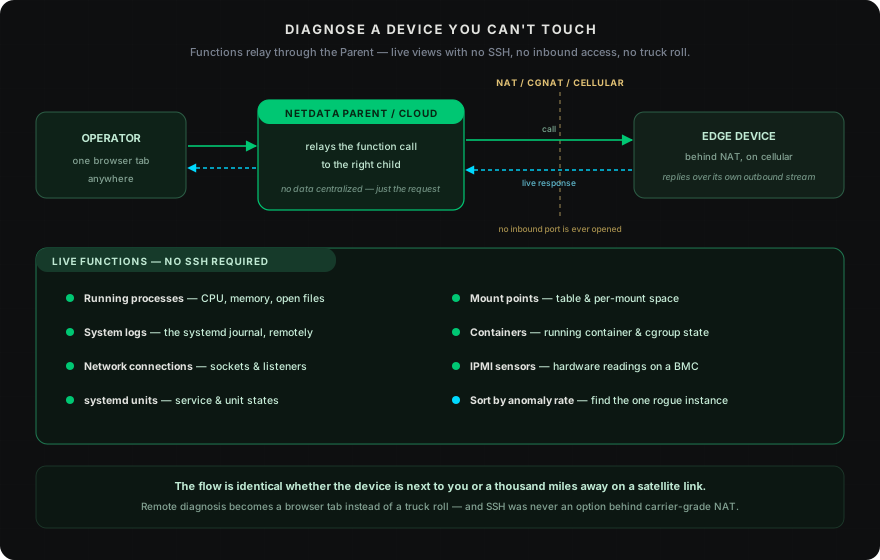
When a fleet operator says “device X is slow,” the instinct is to SSH in, run top, check logs. At thousands of devices that doesn’t scale, and on a device behind NAT on a cellular link you can’t SSH at all — the alternative is rolling a truck.
Netdata’s Functions API provides live views into any child agent through the Parent or Cloud, without SSH and without inbound access:
- Running processes — CPU, memory, open files per process
- System logs — the systemd journal, explored remotely
- Network connections — active sockets and listening services
- systemd units — unit and service states
- Mount points — the mount table and per-mount space
- Containers — running container and cgroup state
- IPMI sensors — hardware sensor readings on servers with a BMC
The flow is identical whether the device is next to you or a thousand miles away on a satellite link: the Parent or Cloud relays the function call to the child, and the child responds. Remote diagnosis becomes a browser tab instead of a truck roll. (Other hardware-health signals — SMART/storage wear, thermals, power, clock synchronization — are collected as metrics with alerts, rather than live functions.) Beyond functions, the NIDL dropdowns on any chart let you sort by anomaly rate or maximum value to find the single rogue instance — the one container pegged at 100% CPU, the one disk saturated — across thousands of instances in seconds.
Central configuration at fleet scale
Changing monitoring configuration on a thousand devices normally means one of three things: SSH to each (doesn’t scale), bake a new image and redeploy (slow, risky), or never change the config at all (the most common outcome).
Netdata’s dynamic configuration (dyncfg) lets you change what a child collects from the Parent, without redeploying the agent, without SSH, and without touching the device. Enable a collector, disable one, change a collection job, adjust a health prototype. Each dyncfg-enabled configuration exposes its own JSON schema and a per-device configuration screen, so operators see exactly what each device is set to and apply changes selectively. It covers the configuration that matters for fleet operation — collector jobs and health rules — rather than every legacy file-based knob.
For OTA rollouts, the same labeling makes telemetry canaries straightforward: group devices by firmware version and watch the new cohort for regressions before the rollout completes.
Seeing the whole site, not just the endpoints
Fleet sites aren’t only endpoints. They have managed switches, routers, access points, and sensors — the infrastructure that connects the devices. When a site goes dark, the first question is whether it’s the devices or the network.
A Netdata Parent collects that infrastructure alongside the child metrics: SNMP monitoring for switches, routers, and access points; SNMP trap collection for asynchronous events; and NetFlow, sFlow, and IPFIX collection for network-traffic visibility. One Parent per site gives full visibility — every endpoint, every switch, every link — through a single pane.
What Netdata is, and what it isn’t
Netdata is an observability platform, not a device-management system. It doesn’t provision devices, push OTA firmware, or manage A/B partitions. What it does is give you full visibility into the effect of those operations — monitoring OTA rollouts by firmware cohort, catching regressions before they cascade, and providing the telemetry canary that tells you whether to proceed or roll back. For team and multi-customer access control across an estate, role-based access is provided through Netdata Cloud.
It also integrates cleanly with OpenTelemetry. The OpenTelemetry plugin listens on OTLP/gRPC (the standard port 4317) and ingests both metrics and logs from any compatible source — collectors, SDKs, instrumented apps — into the same store-and-forward pipeline as everything else. Metrics land on charts with full alerting; logs are stored as journal files and explored through the Logs tab.
For the operational reality of fleet observability — “is each of my N-thousand devices healthy right now, and which ones are failing?” — Netdata is built for the job. The architecture was designed from day one for distributed, outbound-only, intermittently-connected operation. It wasn’t adapted from a datacenter model; it was built for the edge, and it distributes the code, not the data.
How to evaluate fleet observability for your fleet
If you’re comparing options, the test is whether the architecture matches your reality. A practical checklist:
- Test the footprint on your smallest device. Install on the most constrained endpoint you run — the Raspberry Pi, the industrial gateway, the 512 MB ARM box — and measure actual RAM, CPU, and bandwidth under your metric profile. The agent is open source and installs with one command; the defaults are tunable, so profile with the metrics you actually need.
- Check whether you can tell which devices are reporting, right now, without writing a query. If you can’t, your monitoring has a blind spot that grows with the fleet. This is the single highest-leverage capability in fleet observability.
- Verify the connectivity model matches your links. Push from agent, outbound only? Store-and-forward for intermittent links? Keepalive to catch dead NAT mappings? If the architecture assumes reachability, half your fleet will be invisible.
- Confirm clock and hardware-health signals are first-class. Clock-sync state, storage wear, thermal throttling, and power state are the months-long leading indicators that prevent field visits.
- Check the pricing model. Per-host SaaS at thousands of devices is a seven-figure conversation; per-endpoint economics dominate the decision.
For fleets of 500+ devices, you can walk through deployment at your specific scale, connectivity profile, and metric cardinality — book a fleet-scale demo.
Read next
Distributed vs decentralized monitoring, explained →
For robots, kiosks, EV chargers, IoT gateways, and MSP-managed Linux estates at hundreds to tens of thousands of endpoints, Netdata runs an open-source agent on every device that streams to your own Netdata Parents; the Netdata Agent page covers deployment and footprint tuning, and the edge-computing architecture page covers the edge-resident data model behind everything above.