











Netdata has always collected database metrics: connections, throughput, replication lag, buffer cache hit ratios, and so on. These tell you that something is wrong, but they don’t tell you why. When your PostgreSQL response time spikes, the metric alone doesn’t tell you which query is responsible. For that, you’ve traditionally needed to SSH into the box, connect to the database, and run diagnostic queries manually. Or set up a separate database monitoring tool entirely.
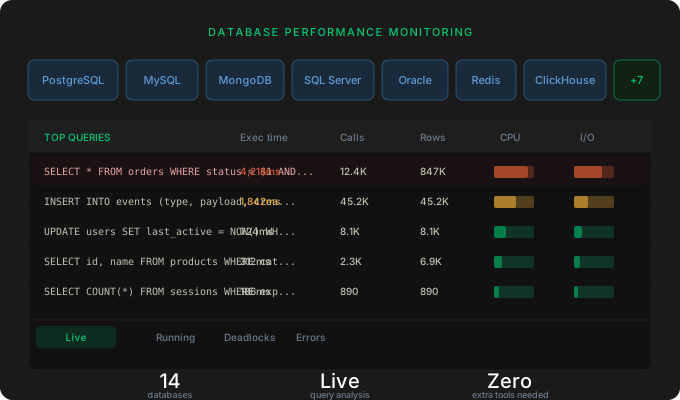
We’ve added interactive query analysis functions to Netdata’s database collectors. You can now see top queries ranked by execution time, currently running operations, deadlock information, and recent errors directly in the Netdata dashboard, for 14 databases.
Tech preview: These capabilities are available now for all Netdata users as part of the standard database collectors. We’re actively developing this into a more comprehensive database monitoring experience with deeper analysis.
What this looks like in practice
Each supported database gets a set of interactive functions accessible from the Live tab in the Netdata dashboard. These are live views, not static metrics. When you open the Top Queries view for your PostgreSQL instance, you’re looking at real data from pg_stat_statements, sorted by whatever dimension matters to you: total execution time, number of calls, rows processed, shared blocks read.
The same applies across all supported databases. For MySQL, the data comes from performance_schema digest statistics. For MongoDB, it pulls from system.profile. For SQL Server, it queries the Query Store. Each database’s function uses the native diagnostic interfaces that DBAs already rely on, but surfaces them in the Netdata UI without requiring a database connection or manual queries.
What’s covered
The coverage varies by database because each engine exposes different diagnostic data, but the core pattern is consistent: top queries (aggregated statistics about your most expensive or frequent operations) and, where the database supports it, running queries (what’s executing right now) plus deadlock and error information.
PostgreSQL provides top queries from pg_stat_statements (execution time, shared block hits and reads, temp blocks) and running queries from pg_stat_activity (duration, wait events, client info, backend state).
MySQL and MariaDB provide top queries from performance_schema (execution time, lock time, rows examined), deadlock info from InnoDB status, and recent SQL errors from the Performance Schema error history.
SQL Server provides top queries from the Query Store (CPU time, logical reads and writes, memory grants, parallelism), deadlock info from Extended Events, and recent errors.
Oracle provides top queries from V$SQLSTATS (CPU time, elapsed time, buffer gets, disk reads) and running queries from V$SESSION (wait events, blocking sessions).
MongoDB provides slow operations from system.profile (execution time, documents examined, keys examined, plan summary).
ClickHouse provides aggregated query stats from system.query_log (execution time, memory usage, rows read and written).
CockroachDB provides top queries from crdb_internal statement statistics and running queries via SHOW CLUSTER STATEMENTS.
Redis provides slow commands from SLOWLOG with command name, duration, and client info.
The full list also includes Couchbase, Elasticsearch/OpenSearch, ProxySQL, RethinkDB, and YugabyteDB. There’s also a generic SQL function that lets you define custom queries for any SQL database, so if your database isn’t on this list but supports SQL, you can still build interactive table views in the Live tab.
What you can do with it
The most common use case is triage. When database latency spikes, you open the Top Queries view and sort by total execution time. The culprit is usually obvious: a query that’s suddenly taking 10x longer than usual, or a new query that’s doing a full table scan. You can see this in seconds without leaving your dashboard.
Beyond triage, it’s useful for ongoing performance hygiene. Sorting by call count surfaces high-frequency queries that might benefit from caching or query optimization. The running queries view shows long-running operations that might be holding locks. Deadlock info (available for MySQL and SQL Server) shows you exactly what happened when two transactions collided.
All of this happens without connecting to the database yourself. If you have a team where the on-call engineer isn’t necessarily the DBA, this is particularly valuable. They can see what’s happening at the query level and either fix it or hand off with useful context.
Configuration notes
Some functions require database-specific configuration. PostgreSQL needs the pg_stat_statements extension enabled. SQL Server needs Query Store turned on. MongoDB needs profiling enabled. These are standard prerequisites that most production databases already have configured, but check each collector’s documentation if you’re not seeing data in the Live tab.
See the database collectors documentation for setup details and prerequisites for each database.
Try it out
These query analysis functions are available now for all Netdata users. If you’re already running Netdata database collectors, update to the latest version and check the Live tab on any database chart.