














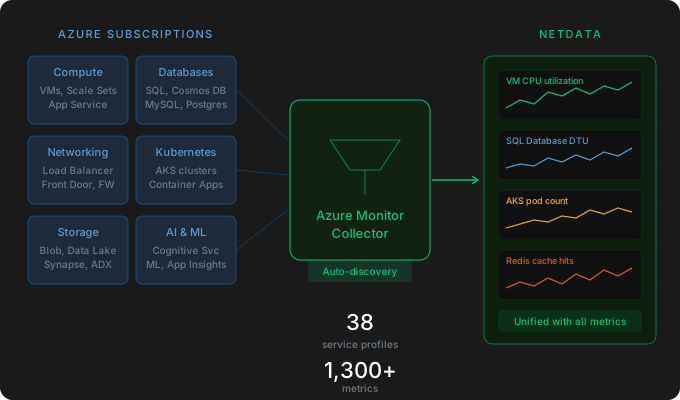
If you’re running infrastructure on Azure, you’ve probably dealt with the split between your Azure-native monitoring and the rest of your stack. Your VMs, databases, and Kubernetes clusters generate platform metrics through Azure Monitor, but those metrics live in a separate world from the OS-level, application, and on-prem metrics you’re already watching in Netdata. You end up checking two (or more) places during incidents, building mental bridges between dashboards that don’t talk to each other.
The new Azure Monitor collector brings your Azure platform metrics into Netdata alongside everything else. Point it at your Azure subscriptions, and it automatically discovers your resources, matches them to built-in metric profiles, and starts collecting. No per-resource configuration required.
Automatic resource discovery
The collector uses Azure Resource Graph to discover resources across your subscriptions. When it finds a resource, it checks whether a built-in profile exists for that resource type and, if so, starts collecting the metrics defined in that profile. You don’t need to enumerate your resources manually or maintain a list that drifts out of sync as your infrastructure changes.
You can scope discovery to be as broad or narrow as you need. Monitor everything in a subscription, or narrow it down by resource group, region, or tags. If you need more control, you can provide a custom Azure Resource Graph KQL query to define exactly which resources to collect from.
Multi-subscription support is built in. A single collector job can monitor resources across multiple Azure subscriptions, which is common in enterprise setups where production, staging, and shared services live in separate subscriptions.
38 service profiles, 1,300+ metrics
The collector ships with 38 built-in service profiles covering the Azure services most teams actually run. Each profile is a preconfigured set of metrics for that resource type, so the collector knows what to collect from a SQL Database versus a Load Balancer versus an AKS cluster without you specifying individual metric names.
The coverage spans compute (VMs, Scale Sets, App Service, Container Apps, Container Instances), Kubernetes (AKS), databases (SQL Database, SQL Elastic Pool, SQL Managed Instance, MySQL Flexible, PostgreSQL Flexible, Cosmos DB, Redis), networking (Load Balancer, Application Gateway, Front Door, Firewall, NAT Gateway, VPN Gateway, ExpressRoute), storage and analytics (Storage Accounts, Data Explorer, Data Factory, Stream Analytics, Synapse, Log Analytics), messaging (Event Hubs, Service Bus, Event Grid, IoT Hub), AI and ML (Cognitive Services, Machine Learning, Application Insights), and integration services (API Management, Logic Apps, Key Vault, Container Registry).
That’s over 1,300 metrics across these profiles. If you need metrics beyond what the built-in profiles provide, you can create custom profiles for any Azure resource type that exposes metrics through Azure Monitor.
Built-in alerts
The collector includes 454 pre-configured alerts for critical conditions across the supported Azure resource types. These follow the same pattern as other Netdata alerts: they’re active by default, you can customize the thresholds, and they integrate with whatever notification channels you’ve already configured.
Configuration
You can set the collector up entirely through the Netdata Dynamic Configuration UI without editing files on disk. Provide your Azure credentials, specify which subscriptions to monitor, optionally set discovery scope (resource groups, regions, tags), and the collector handles the rest.
For detailed setup instructions, authentication options (service principal, managed identity), custom profile creation, and tuning, see the Azure Monitor collector documentation.
Why this matters
The value here isn’t just that Netdata can read Azure metrics. It’s that your Azure platform metrics now live in the same place as your OS metrics, application metrics, container metrics, and everything else Netdata collects. When a SQL Database on Azure starts showing elevated DTU consumption, you can see that alongside the CPU and memory usage of the VM running your application code, in the same timeline, with the same correlation tools, without switching dashboards.
We’ll keep expanding the profile coverage and refining the configuration experience based on your feedback. If you’re running Azure infrastructure, give it a try and let us know what you think.